

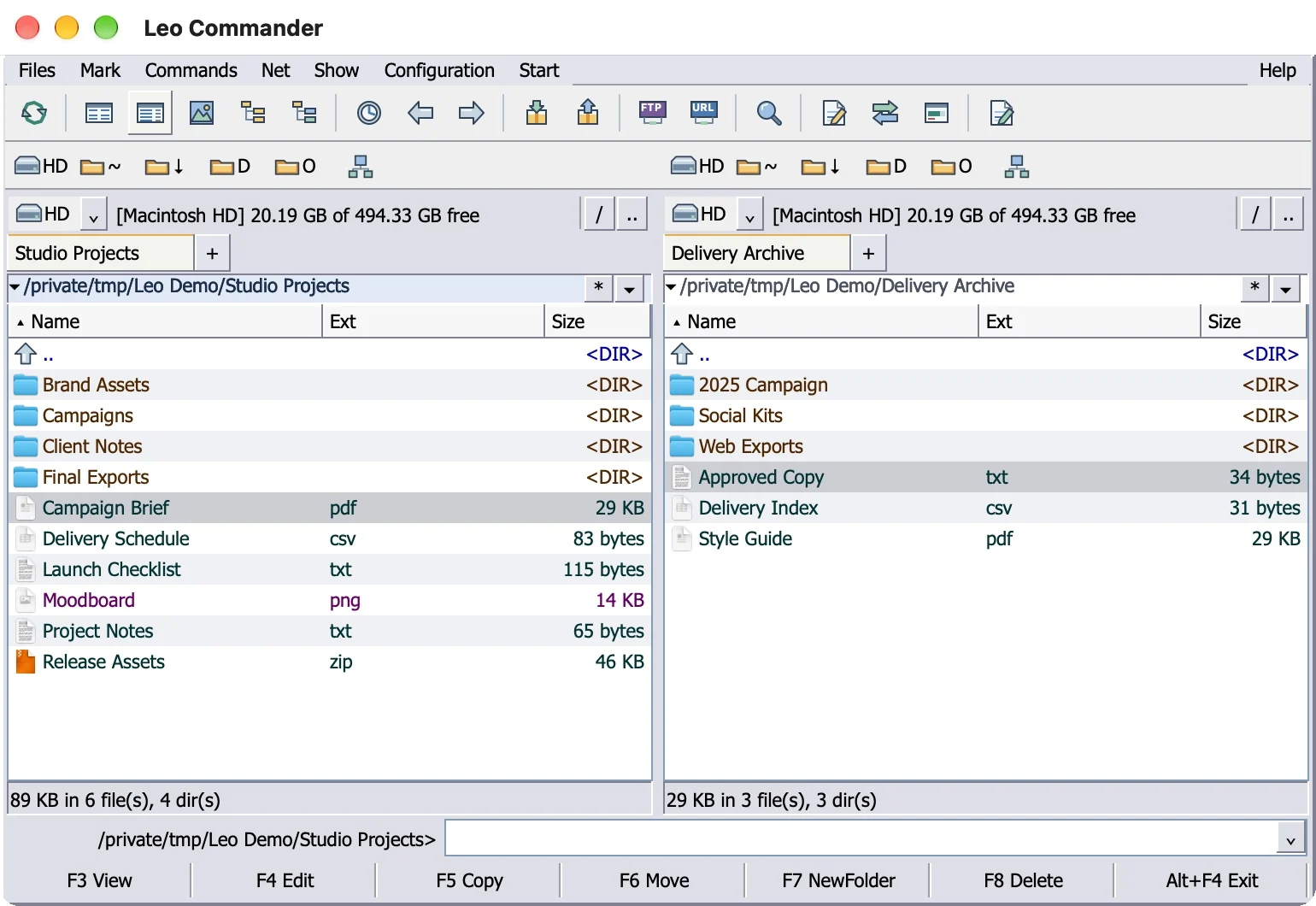
There is no Total Commander for Mac. Ghisler Software GmbH makes Total Commander for Windows and a free Android version, and the official download page points Mac users to VMware Fusion, Parallels or CrossOver to run the Windows program. Your other choice is a native Mac file manager that works like Total Commander: CRAX Commander, Commander One or Leo Commander.
Leo Commander is our app. Every competitor fact below comes from the vendor's own pages, prices were checked on November 8, 2026, and the section on what Leo Commander does not do yet is as specific as the rest.
Is there a Total Commander for macOS?
No. The current release, Total Commander 11.58.1 from October 29, 2026, is a Windows program. The 32-bit build runs on Windows 95 through Windows 11, the 64-bit build on Windows XP through Windows 11. Ghisler also publishes Total Commander for Android (version 3.62), free on Google Play with no ads. The site lists no macOS or Linux download.
The Total Commander download page has a short section headed for Apple Mac users. It suggests a Windows emulator (VMware Fusion, Parallels or CrossOver) and links to a few Mac file managers, including Commander One. So when another site promises "Total Commander for Mac", it means one of two things: the Windows program running on a Mac through a virtual machine or CrossOver, or a different app built to work like it.
Leo Commander is in the second group. It is not Total Commander, and it is not affiliated with, approved by or endorsed by Ghisler Software GmbH.
Run the real Total Commander on a Mac
If you depend on a particular plugin, a heavily customized button bar or years of settings in wincmd.ini, running the Windows program is the only way to keep all of it. Macs with Apple silicon cannot use Boot Camp, which Apple supports only on Intel-based Macs. That leaves a virtual machine or CrossOver.
One detail matters on Apple silicon. Ghisler offers 32-bit and 64-bit builds and lists no Arm build, while an Apple silicon Mac runs the Arm version of Windows 11. Microsoft says x64 and x86 apps can run on Apple silicon Macs through emulation, so Total Commander can run there as an emulated app.
Parallels Desktop
Microsoft names Parallels Desktop as an authorized way to run the Arm versions of Windows 11 Pro and Enterprise on Macs with M1, M2 and M3 chips. Each copy of Windows needs its own Windows 11 license, bought separately. Parallels Desktop 27 requires a Mac with Apple silicon.
Parallels Desktop is paid software with several editions. Check parallels.com for the current prices before you buy, and budget for the Windows 11 license on top.
VMware Fusion
VMware Fusion has been free for everyone (commercial, educational and personal users) since November 11, 2024, and the paid Pro version is no longer sold. On Apple silicon, Broadcom says you must use the Arm version of Windows 11.
Check one limit before you pick it for file management. Broadcom's feature list for Windows 11 on Apple silicon says Shared Folders works only for Linux guests on Fusion for Arm, and Unity mode is not supported. Total Commander inside a Windows guest in Fusion therefore cannot reach your Mac folders through Shared Folders, so you need another route to your files.
CrossOver
CrossOver from CodeWeavers takes a different approach: no virtual machine and no Windows license. It runs many Windows apps directly on macOS by converting Windows instructions into macOS equivalents. Apple silicon is supported from CrossOver 21 on macOS 11.1 or later.
The CodeWeavers compatibility database rates Total Commander "Runs Great" on macOS, listed against CrossOver 26.1.0. On the CodeWeavers store on November 8, 2026, CrossOver+ cost $74 with 12 months of upgrades and support, CrossOver Life cost $494, and a 14-day trial was free.
What you trade
Every route here still needs a Total Commander license (42 euros before VAT on ghisler.com). You also live with a Windows program inside macOS: Windows dialogs, Ctrl-based shortcuts, and in a virtual machine, a second operating system to update. In return you get the exact program you know, with the Windows plugins it loads today.
Native Total Commander alternatives for Mac
A native app skips Windows entirely. It runs as a normal Mac program and works on your Mac folders directly, with no virtual disk in between. This guide covers three apps built around the Total Commander way of working. Double Commander is also a free cross-platform option, covered in our post on Double Commander on Mac. For a wider look at two-panel apps on the Mac, see our guide to dual-pane file managers.
CRAX Commander
CRAX Commander is a paid file manager made only for the Mac. Version 1.16.16 needs macOS 12 or later, runs native arm64 code on Apple silicon and is built with Apple's AppKit framework, and the direct download is a notarized Developer ID build. It follows the core Total Commander keys: F3 to F8, Tab, an
The trade-offs are in the details. The menus use Mac names (File, Edit, View, Command, Go) rather than the Total Commander names, and the official help page says F8 deletes permanently, so it scores No for “F8 deletes to the Trash”. There is no free version: the 10-day demo blocks compression, decompression and settings export. The one-time license costs $25.99 direct or $25.49 on the Mac App Store and includes minor-version updates only, and the direct version needs periodic online license activation. In our 25-point comparison CRAX Commander scores 21, and Leo Commander scores 25.
Commander One
Commander One is a dual-pane Mac file manager for macOS 10.13 or later that runs natively on Apple silicon and Intel Macs. It keeps F3 to F8 and a function key bar, and the free version handles ZIP archives. The PRO Pack (a $29.99 one-time personal license for one Mac on November 8, 2026) adds RAR and 7z, an FTP client, WebDAV, Amazon S3, Dropbox, Google Drive and a terminal emulator. A Lifetime Upgrades Guarantee is sold as an extra.
For Total Commander users, the gaps are specific: no multi-rename tool, folder sync or branch view in its feature list, and one release (3.18, September 25, 2026) in the last 12 months. It scores 17 of 25 in our comparison.
Leo Commander
Leo Commander is a native Mac app compiled for Apple silicon that needs macOS 12 or later. The window follows the Total Commander layout from top to bottom: menus, toolbar, drive buttons, two panels, command line and
The free version covers daily work: both panels, the
Total Commander for Mac options compared
Prices come from each vendor's site on November 8, 2026. The score is our 25-point comparison from November 7, 2026, which covers native apps. Speed is not scored, because no independent benchmark covers all of the apps.
| Option | How it runs | Total Commander keys | Cost | Main trade-off | Score |
|---|---|---|---|---|---|
| Total Commander in Parallels Desktop | Windows 11 on Arm in a virtual machine | All (it is Total Commander) | Paid Parallels license, plus Windows 11 and a Total Commander license | A full Windows install to license and maintain | Not scored |
| Total Commander in VMware Fusion | Windows 11 on Arm in a virtual machine | All | Fusion is free, plus Windows 11 and a Total Commander license | No Shared Folders for Windows guests on Apple silicon | Not scored |
| Total Commander in CrossOver | Windows app on macOS, no Windows needed | All | CrossOver+ $74 (12 months of upgrades), plus a Total Commander license | A Windows program inside macOS | Not scored |
| CRAX Commander 1.16.16 | Native app with arm64 code for Apple silicon | F3 to F8 (the help page says F8 deletes permanently), Tab, | $25.99 once direct, or $25.49 on the Mac App Store; 10-day demo | No free version, minor-version updates only, Mac menu names | 21/25 |
| Commander One 3.18 | Native app | F3 to F8, | Free, or PRO Pack $29.99 once | No multi-rename, sync or branch view; servers and terminal in PRO | 17/25 |
| Leo Commander | Native app for Apple silicon | F3 to F8, Tab, | Free, or Pro | No plugins, ZIP only, servers copy only | 25/25 |
What carries over key by key
Most Total Commander keys work the same way in Leo Commander. Ctrl shortcuts move to the Command key, and two letters changed meaning: ⌘B saves the current folder to Favorites (in Total Commander, Ctrl+B is branch view), and ⌘F finds files (in Total Commander, Ctrl+F connects to an FTP server). The full map, with Finder equivalents, is in our post on Total Commander shortcuts on Mac.
| Total Commander (Windows) | Leo Commander (Mac) | What happens |
|---|---|---|
| F3 List files | F3 | Built-in viewer, text or hex |
| F4 Edit files | F4 | Opens the file in TextEdit by default |
| F5 Copy files | F5 | Copies the selection to the other panel, in the background |
| F6 Rename or move | F6 | Moves the selection to the other panel |
| F7 Create directory | F7 | New folder in the active panel |
| F8 or Del Delete | F8 | Asks first, then moves the items to the Trash |
| Tab | Tab | Switches panels |
| Backspace | Backspace | Goes up one folder |
| Enter | Return | Opens the folder or file, and opens a ZIP file like a folder |
| Insert | Insert or ⇧↓ | Marks the file and moves to the next one |
| Space | Space | Marks a folder and shows its size |
| ⌥F7 or ⌘F | Find Files by name, text or size, also inside ZIP files | |
| Ctrl+T New tab | ⌘T | New tab on either side |
| Ctrl+W Close tab | ⌘W | Closes the tab |
| Ctrl+D Directory hotlist | ⌘D | Opens Favorites; ⌘B adds the current folder |
| Ctrl+X then Ctrl+V | ⌘X then ⌘V | Dims the files, then moves the files into the open folder |
| Ctrl+Q Quick View panel | ⌘Y | Opens Quick Look, the Mac's own previewer |
| Pack and Unpack | Creates and extracts ZIP files | |
| Ctrl+M Multi-Rename Tool | Multi-Rename (Pro) | Renames many files with a live preview |
| Ctrl+B Branch view | Branch View (Pro) | Every file from the subfolders in one list |
| Exit is on the |
What is different on a Mac
Command replaces Ctrl
Mac shortcuts are built from four modifier keys: Command ⌘, Option ⌥, Shift ⇧ and Control ⌃. Apple's own advice for Windows keyboards is to press Alt instead of Option and Ctrl or the Windows logo key instead of Command. So Ctrl+T becomes ⌘T, and
The Trash replaces the Recycle Bin
In Total Commander, F8 sends files to the Recycle Bin or deletes the files directly, depending on your configuration. On a Mac, deleted files go to the Trash. In Finder you restore an item with File > Put Back and empty the Trash with ⇧⌘Delete. To clear old items automatically, open Finder > Settings > Advanced and select "Remove items from the Trash after 30 days" (Finder > Preferences on macOS 12). Leo Commander's F8 asks first, then moves the items to the Trash.
Paths start at / instead of C:\
Mac paths have no drive letters. Folder names are separated by slashes, home folders live in /Users (yours is also ~), and every mounted disk gets a folder in /Volumes, including servers mounted with Connect to Server. Finder hides /Volumes. In Leo Commander the drive buttons list every mounted volume with its free space, and ⌘L or ⇧⌘G lets you type a path such as /Volumes/Backup straight into the panel.
F-keys need Fn on Mac laptops
On Apple keyboards the top row controls Mac features such as display brightness, Mission Control and volume. To send F5 instead, hold Fn (or Globe) while you press it. If you live in
Switching checklist for Total Commander users
- Install the free version from the Leo Commander download page. It needs macOS 12 or later.
- Turn on standard function keys, or get used to holding Fn.
- Open your Directory hotlist in Total Commander (Ctrl+D) and write down the folders. On the Mac, open each folder and press ⌘B; ⌘D brings up the list.
- Note any custom keys from Configuration > Options > Misc. > Redefine hotkeys. Leo Commander Pro lets you set custom keyboard shortcuts.
- List the plugins you use and the job each one does. ZIP is built in, RAR and 7z are not supported yet, and Windows plugins do not load.
- Learn three places: ~ (your home folder under /Users), /Volumes (every mounted disk and server) and /Applications.
- Decide how long deleted files should sit in the Trash, and set Finder's 30-day option if you want it.
- Keep a Windows virtual machine if one plugin or workflow has no Mac replacement. Running both is fine.
What Leo Commander does not do yet
- No plugins. Total Commander plugins are Windows files and do not load.
- ZIP is the only archive format. RAR and 7z are not supported yet, and a ZIP file opened with Return is read-only.
- Server panels (Pro) copy files, but cannot move or edit files on the server, and there are no saved connections yet.
- When a copy hits a name clash, the choices are keep both or abort.
- Multi-Rename, Synchronize Directories, Branch View, server panels and custom shortcuts are Pro features, not part of the free version.
If one of the gaps above blocks your workflow, the real Total Commander in a virtual machine fits better today. If not, start with the free version of Leo Commander. The Free and Pro comparison shows exactly which features sit in each version.
Sources
- Total Commander download page (Ghisler)
- Options for using Windows 11 with Mac computers with Apple M1, M2 and M3 chips (Microsoft Support)
- Features of Windows 11 VM on Mac with Intel vs. Apple silicon (Broadcom Knowledge Base)
- Total Commander in the CrossOver compatibility database (CodeWeavers)
- How to use the function keys on your Mac (Apple Support)
Checked November 8, 2026. Leo Commander is an independent app, not affiliated with Ghisler Software GmbH or Apple Inc.


